Track collected taxes
Prepare your tax returns: the module totals, month by month, the taxes of the certified invoices and credit notes — VAT and specific taxes (AIRSI, tourism taxes…).
The interface is in French
The Minlessika interface and the screenshots below are in French. Each tab or button name is shown here as it appears on screen, with its English translation in parentheses.
Prerequisites
- Certified invoices over the period to check
Steps
1. Pick the period
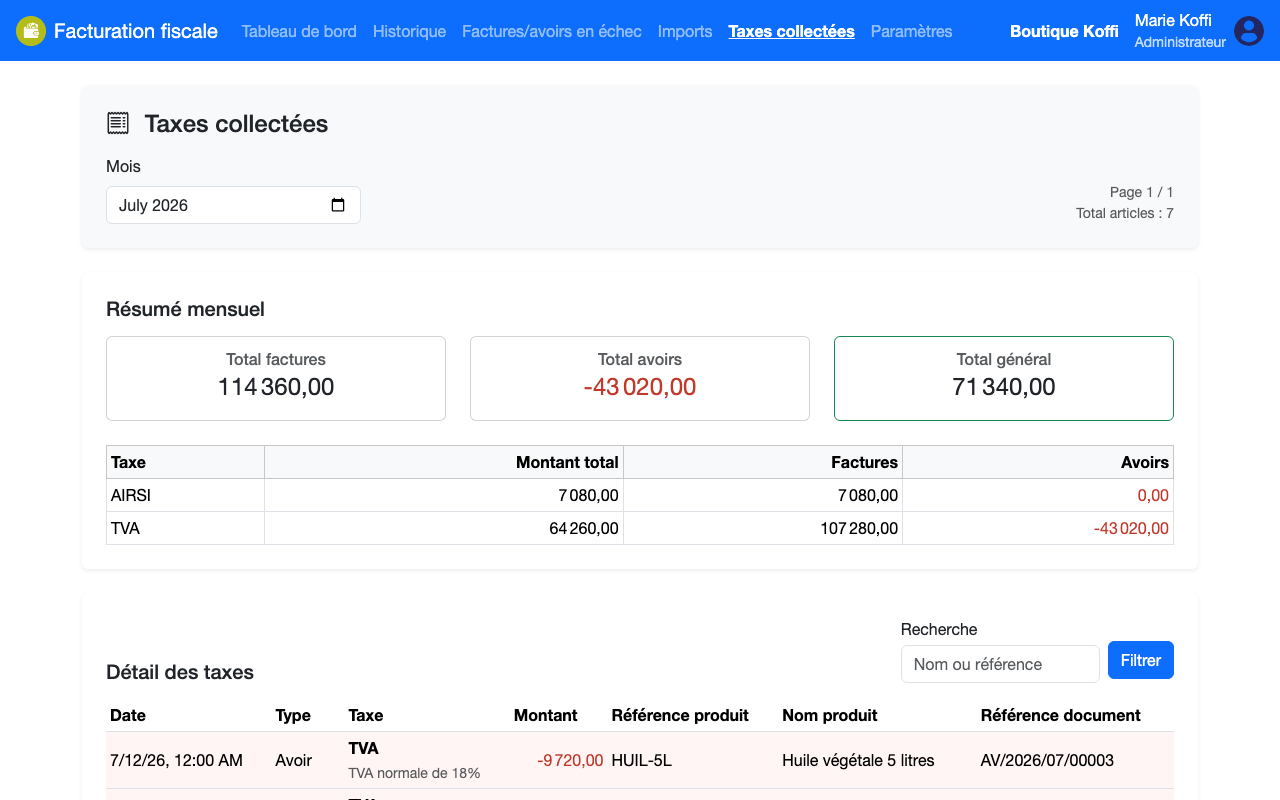
Open Taxes collectées (Collected taxes) and select the month — the last twenty-four are offered. The summary shows the Total factures (Invoice total), the Total avoirs (Credit note total, deducted) and the Total général (Grand total).
2. Read the breakdown by tax
The summary table breaks down each tax: amount collected on invoices, amount taken back by credit notes, net amount. The tax detail then lists each taxed line with its product, its amount, and the certified source document.
Finding a line
The Recherche (Search) field filters the detail by product name or document reference — handy to justify an amount during an audit.
What next?
The amounts taken back by credit notes appear as negative: to understand where they come from, see Create a credit note on a certified invoice.
Changelog
- 2.0 (August 1, 2026): monthly summary labels updated.
- 1.0 (July 12, 2026): document created.